S Sandustry Tips
Transport building

How to Use Conveyor Belts in Sandustry

Conveyor Belts move solid pixels sideways. If a belt line fails, the cause is usually one of four things: the direction is wrong, the drop-off tile is blocked, the receiving machine is full, or the front pixel has no valid place to go.

Solid pixels only Check direction first Watch the drop-off tile Shift reverses direction Front-pixel jams stop the stack
Quick checks

Confirm these before rebuilding the route

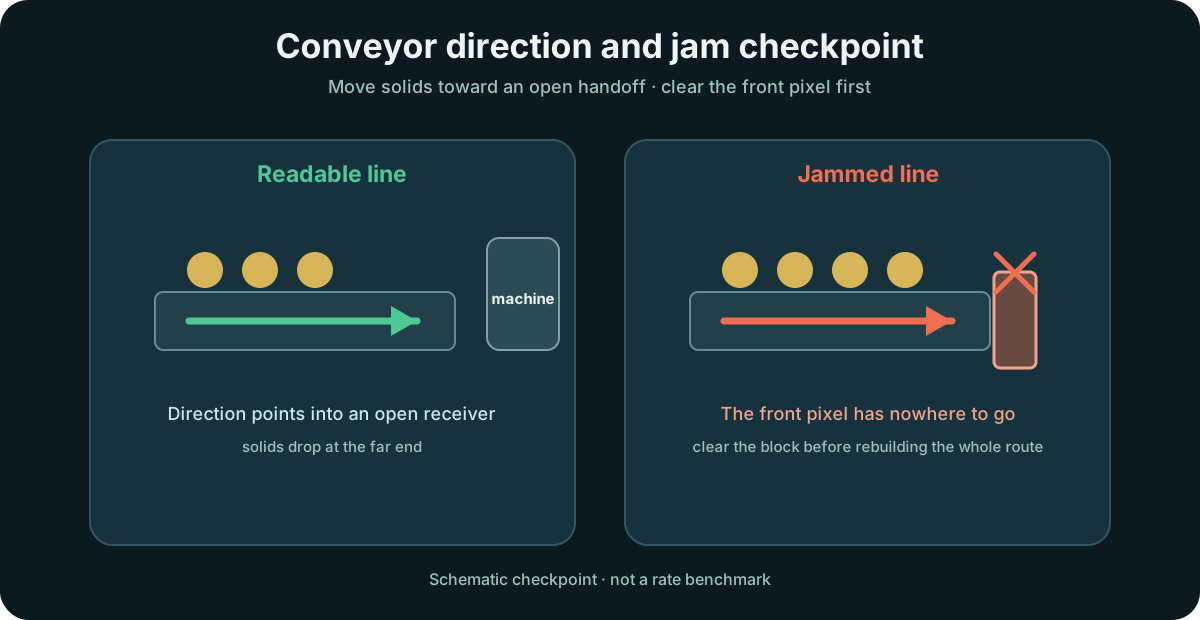
  • The belt points toward the next machine or drop tile
  • The front pixel is not pressed into a blocked output
  • The receiving tile is empty enough to accept solids
  • Hold Shift while placing if the belt must run the other way
Sandustry Conveyor Belt diagram showing correct belt direction into a machine and a jammed line blocked at the front pixel
Conveyor checkpoint: confirm direction and the front pixel before rebuilding the whole route.

Build a Belt Line That Actually Clears Output

A working belt route is a handoff chain, not just a strip of tiles. Start with the direction, then verify where solids land, and only then widen the rest of the line.

Step 1

Set the travel direction

A Belt carries pixels the way it faces, and holding Shift while placing reverses it. Get the direction right the first time so the whole line feeds the right machine.

Checkpoint: the Belt points toward your target, not into a wall.

Step 2

Load solids, not liquids

Only solid pixels ride a Belt. Liquids do not follow its travel direction — water flows across it exactly as it would over any other ground, so a Belt is a solid mover that happens to stop liquid from passing.

Checkpoint: solids move while liquids flow over instead of hitching a ride.

Step 3

Hand off at the far end

When a pixel reaches the end of the Belt it is pushed over the edge. Let it fall into the next machine, or tip it onto a Launcher when it needs to go up instead of across.

Checkpoint: pixels drop off the end into the next stage.

Step 4

Unlock it via Logistics for 30 Gold

The Conveyor Belt and the Launcher come from the same Logistics node, which costs 30 Gold in Tier 1. One purchase hands you both halves of the transport puzzle at once.

Checkpoint: the Logistics node is unlocked in Tier 1.

When the Belt Stalls

A stopped Belt is usually not a broken Belt. Check one of these three faults and the line usually restarts on its own.

Jam point

The front pixel has nowhere to go

Look at the leading pixel first: if it has nowhere to go, the whole line behind it locks up. Clear that one pixel and the rest starts flowing again.

Blocked layer

Only the bottom layer is driven

The Belt moves only the pixels actually touching its surface; the pile above just rides on them. Block the bottom one and the entire stack holds still instead of flowing over the obstruction.

Water confusion

Water is not being moved

Liquids ignore a Belt's direction and pass across it like any other ground. That is normal — if you need to move water, use a Pump and Pipes instead of a Belt.

Core belt rule

A Conveyor Belt moves solid pixels horizontally in its facing direction, blocks liquids, gases, and players, and usually looks "stuck" only because the front pixel has nowhere valid to go.

What still depends on the route

Final throughput and the best logistics layout still depend on the receiving tile, the next machine, and how cleanly the rest of the route stays open. Verify the handoff before blaming the belt body.

Featured Questions

How do Conveyor Belts work in Sandustry?

They carry solid pixels horizontally in the direction they face, while liquids ignore the belt direction and flow as normal terrain behavior.

Why is my Conveyor Belt not moving items in Sandustry?

The most common cause is not the belt body but the front pixel having nowhere valid to go, or the route facing the wrong direction.
Primary Sources

Next step

If belts are backing up, open Conveyor Problems. If the route is stable, use the Production Calculator to plan the next ratio change.